


Google Scholar is a powerful tool for finding scholarly publications that helps researchers, students, and professionals find relevant and credible research. In this article, we will discuss what Google Scholar is, how to optimise your search queries and what strategies to use to effectively search for scholarly literature.

What is Google Scholar?
Google Scholar – is a specialised search engine developed by Google that indexes scholarly articles, books, dissertations, conference proceedings and other types of scholarly publications. It covers a wide range of disciplines and provides access to full text, abstracts and metadata of publications.
It is worth noting that Google Scholar differs from a regular Google search in that it focuses exclusively on scholarly and academic sources, minimising the appearance of unverified or irrelevant information.
Google Scholar has a number of advantages, which include:
- access to scholarly sources: the platform provides access to millions of scholarly publications that inform research across disciplines;
- citation: Google Scholar enables researchers to not only track citations of their own publications, but also to correctly cite the work of other researchers;
- ease of use: an intuitive interface similar to Google search makes it easy to find content by keyword, author, or title.
- author and journal metrics: the platform gives access to author profiles with their h-index, number of citations and list of publications, and provides information about journals.
- multilingual: search for publications in different languages.
How do I optimise my search query in Google Scholar?
An effective Google Scholar search starts with a well-designed query. There are a number of rules that should be followed to ensure that the system provides you with content that best suits your query and needs.
Here are a few guidelines to help improve the accuracy and relevance of your results:
1. Use keywords
Formulate your query succinctly, using key terms related to your topic. For example, instead of ‘climate impact studies,’ use ‘climate change impacts on ecosystems.’
Also, to improve search efficiency, use terms in English, as most scientific publications are indexed in English.
2. Apply search operators
Google Scholar has an advanced search function to help optimise your query. To access it, you should:
- Go to the Google Scholar home page.
- Click on the three horizontal bars in the top left corner of the screen.
- Select "Advanced Search".
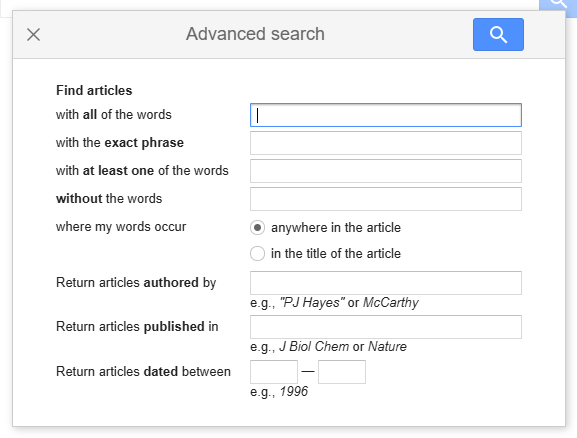
To find relevant content, it's worth using advanced search operators to help the system more accurately identify your query.
The basic operators include:
- ‘ ‘ (inverted commas) – search for exact phrases. For example, the query ‘artificial intelligence in medicine’ will show only those articles that contain this exact phrase.
- author: – search by author. For example, author:Johnson will display the works written by the author with the surname Johnson.
- title: – search by title. For example, title: ‘AI dynamics in medicine’ will provide articles with this phrase in the title.
- pub_year: – filter by publication year. For example, pub_year:2025 will show materials published in 2020.
- site: – search by a specific site. For example, site:edu will display publications posted on sites with .edu domain.
- OR – logical operator ‘or’. For example, the query ‘medicine’ OR ‘artificial intelligence’ will show materials related to one or both topics.
- - (minus) - excludes a word from the search. For example, ‘medicine-surgery’ will find articles about medicine that do not mention surgery.
3. Filter publications by relevance
To find the most recent and relevant content, sort results by date (e.g., ‘since 2020’). Also, if you are interested in publications with the most citations, use the ‘Sort by relevance’ filter. This way you can analyse which papers are the most popular among other studies.
Strategies for using Google Scholar effectively
Beyond query optimisation, there are additional ways to improve your Google Scholar performance. These are aimed at utilising the various features of the platform. Below, we'll take a closer look at each of them.
1. Creating a Google Scholar profile
The first thing you should do when you start working with Google Scholar is to create and set up a personal scholar profile. This way you can track your publications and get recommendations based on your preferences.
How to get recommendations: set up Alerts for keywords or new articles by a specific author. For example, create an alert for the query ‘cardiovascular disease treatment’ and Google Scholar will send new articles to your email.
2. "Cited by"
Google Scholar allows you to find scholarly papers that cite a publication of interest to you.
How it works:
- Find a publication on the topic you want.
- Under the title of the publication, click on the ‘Cited by’ button.
- After clicking on the link, you will be presented with a list of scientific papers that cite the publication.
The advantage of this feature is that you can find publications on similar topics and use them in your research.
You can also use the ‘Related articles’ feature in Google Scholar, which is located next to the ‘Cited by’ button under the title of the publication, to search for similar articles.
3. Library access
In your Google Scholar settings, you can add access to your university or organisation's libraries. This will allow you to find full text of paid articles through institutional subscriptions.
How to enable this feature: Settings → Library Links → Enter your organisation's name.
Google Scholar is an indispensable tool for finding scholarly literature if you know how to use it effectively. By following our tips, you can optimise your search query and maximise the potential of the platform for your research.
Do you need help with increasing your citation and Hirsch index in Google Scholar? Contact "Scientific Publications". Our experts will conduct a free audit of your profile, arrange citations according to journal requirements, and fulfil all technical aspects. To get a free consultation from our manager, fill in the form below, and he will contact you as soon as possible. Together to new scientific achievements!


